MiniMax H3 Review: How Close Is AI Video to Commercial Delivery?
MiniMax has released its latest video model, MiniMax H3. It accepts text, images, video, and audio in the same generation, produces clips up to 15 seconds, outputs up to 2K, and can generate native stereo sound.
Those specifications are not the most important part of H3. Commercial video is difficult not because it needs one beautiful shot, but because products, logos, and type have to stay accurate, the visual system has to carry across versions, and client revisions cannot force the team to start again. Brand films, ecommerce assets, product explainers, app demos, and event promos move quickly and multiply across channels. Control often matters more than spectacle.
H3 moves closer to those needs. Images, video, and audio can each constrain a different part of the same generation; type, graphics, and rhythm can be composed as motion; and an existing result can be revised instead of discarded. It does not replace a full post-production pipeline, but it is beginning to carry more of the work between generation and delivery.
Multimodal reference: every asset needs a role
Commercial work rarely begins with a single prompt. A team usually already has product imagery, character designs, brand references, motion references, and audio. The challenge is making the model understand what each asset should control. H3’s Omni-Reference brings them into one task: images can constrain characters or products, video can define movement and camera language, and audio can shape voice and rhythm.
The fashion campaign uses four reference images. Image 1 defines the desert-road setting, film texture, and overall atmosphere; image 2 provides the character; image 3 provides the black bag; and image 4 constrains the ending logo. Instead of asking H3 to copy one image, the prompt assigns each reference a job, then defines the film’s tone: premium, cool, restrained, and more agile than a conventional narrative film or ecommerce ad.
The story remains simple. On a desert road beside a vintage car, a woman returns to the trunk, takes out a black bag, shares a quiet moment with the man by the car, then walks away with it. The real test is not the plot. It is whether H3 can preserve the people, the bag, the ending logo, and the visual language while making the clothing and product feel like part of the character’s behavior. That is much closer to the input structure of a real brand campaign than a single character or camera reference.
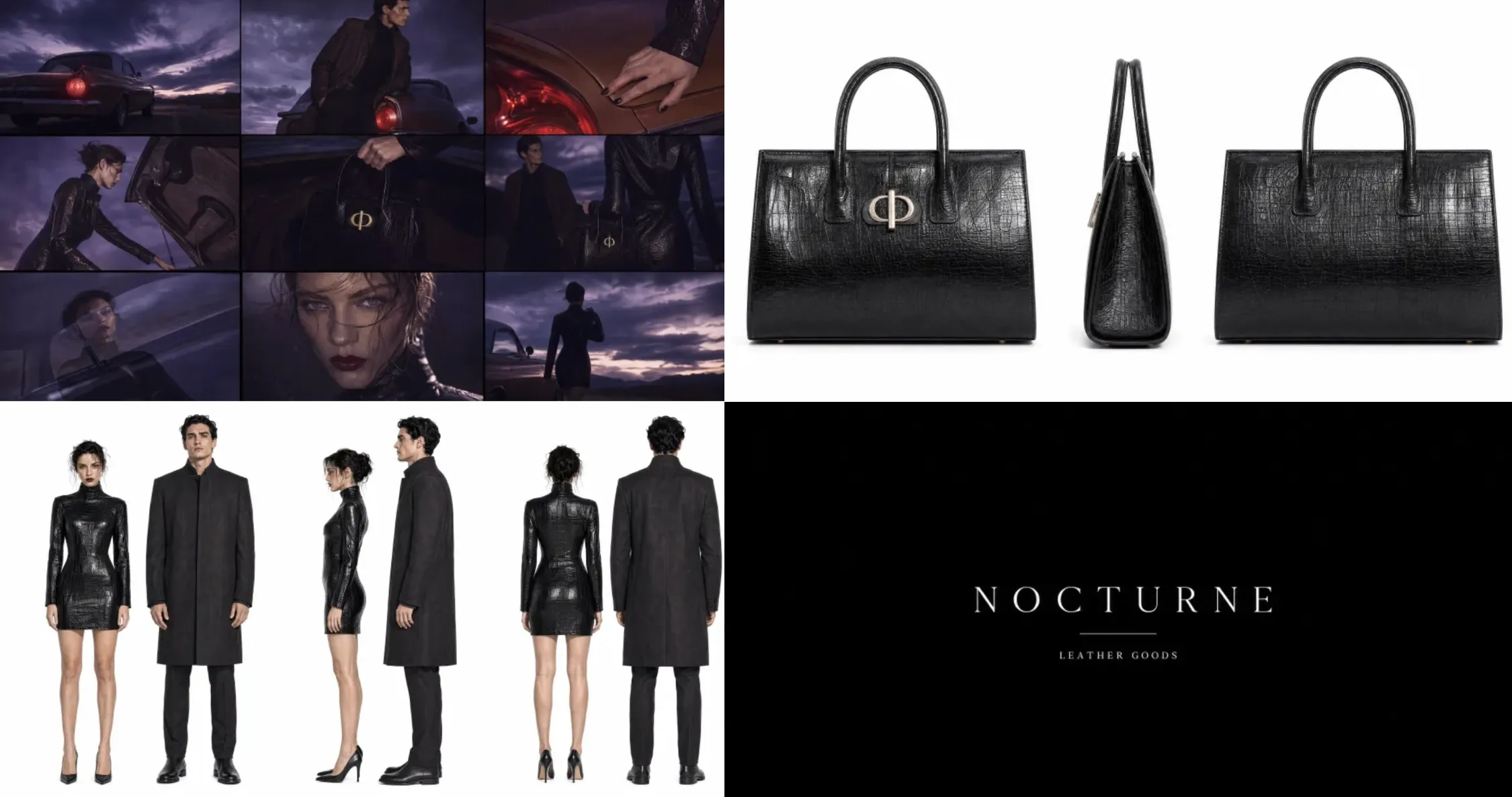
More references are not automatically better. H3 accepts up to nine images, three video clips, and three audio clips, with a mixed-input limit of twelve files. As the set becomes more complex, hierarchy becomes easier to lose. In practice, each reference should carry one constraint, with its role stated clearly in the Prompt.
Motion design: H3’s clearest commercial opening
Motion design may be H3’s clearest commercial opening. Brand films, ecommerce assets, product launches, and social content all need visual packaging: posters that move, type that remains readable, and graphics, transitions, and music that share one rhythm. Earlier video models were stronger at people, environments, and camera movement than typography or motion graphics. H3 begins to handle type, lines, graphic layout, and pacing together.
The crime-title sequence demonstrates that shift. Fine white lines draw a frame, a character name slides into place and decelerates, then the composition cuts into an asymmetric split screen on the beat. The lettering holds together in motion and remains on screen long enough to read. The easing and beat-matched cuts avoid the weightless, constant-speed movement common in generated animation.
H3 can turn a flat visual system into a motion concept with a coherent design rhythm. That makes it useful for opening titles, brand campaigns, UI concepts, and product-launch films. The result is still a rendered clip, not an After Effects project with editable layers and keyframes. Precise typography, interaction logic, and final delivery still belong in production tools.
2K output: clarity is only the beginning
For branded video, high resolution is not just about a sharp still frame. Type has to remain readable in motion, logos and product structures cannot deform, and fixed graphic elements cannot drift with the camera. H3 outputs up to 1440p and reprocesses detail against the prompt and references instead of merely enlarging the original frame. That gives brand elements a better chance of surviving complex transitions.
The test uses four consecutive keyframes to simulate an old telescope searching for a MINIMAX installation. It begins out of focus with handheld shake, then pushes in and racks focus. Whip pans, motion blur, optical trails, and exposure flicker bridge the frames. A fixed binocular mask stays locked throughout, so only the image inside the lenses is allowed to move.
The case also tests type under real motion. In the second frame, the MINIMAX wordmark follows restrained fabric movement while remaining legible. Red type moves from soft focus and low opacity into clarity as the shot refocuses, then fades or disappears into motion blur before the next cut. The question is no longer simply whether 2K looks sharp, but whether the mask, composition, brand type, and keyframe relationships remain stable across motion. Final review still needs to catch deformation, drift, or any element the model adds on its own.
Video editing: can a new look preserve the original fashion film?
Fashion campaigns often need different clothing and accessories for product lines, regions, or channels. Reshooting means bringing the model, styling, location, and lighting back together. H3 can edit a finished video from a written instruction and replace selected objects. The value is not simply changing the look, but preserving the person, pose, camera movement, and image quality around the change.
The case starts from a completed fashion film and replaces only the model’s clothing and eyewear. That simple brief tests both local editing and temporal consistency: the new garment has to follow the body naturally, the glasses must sit correctly against the face and lighting, and the face, hair, pose, background, and camera rhythm should remain untouched.
This case tests whether H3 can turn a reshoot into a controlled styling replacement. The glasses and clothing are successfully changed while fabric deformation, accessory fit, character identity, and lighting remain stable. However, details around the glasses’ temples—and their overall structure as the character turns at the end—still resemble the original pair too closely, preventing a fully clean replacement.
Native sound: can music and image work from the first pass?
Music often enters late in the video process, but it is not an add-on for music videos, brand shorts, or fashion campaigns. Edit speed, image texture, and type treatment all depend on the musical direction. H3 can generate video with native stereo sound, so music, editing, and visual style can be judged together from the first pass instead of building a silent clip and guessing its eventual rhythm.
The case is a dark-pop, cyber-grunge, and rap music video with a realistic high-fashion finish. Its visual language draws on late-1990s and early-2000s independent magazines, photocopies, film scans, underground music posters, and zine collage. Coarse grain and subtle film jitter establish the texture. The edit stays fast and uses hard cuts only, with no fades or soft transitions.
The case goes beyond proving that H3 can output picture and sound together. Music, edit rhythm, and visual style form one coherent language, which puts H3 at a useful baseline for sound-led concepts.
Where does MiniMax H3 belong in the workflow?
Across these capabilities, MiniMax H3 is better suited to short commercial work with clear references and frequent versioning than to long-form narrative. Product launches, brand campaigns, ecommerce assets, app demos, and music videos can all begin with existing product imagery, visual guidelines, motion references, and audio, then use H3 to establish a near-finished direction inside 15 seconds.
MiniMax H3 belongs in visual exploration, motion concepts, version production, and early revisions. It can turn flat assets into motion, bring sound into the conversation earlier, and support faster iteration. Long-form storytelling, dense UI, exact typography, character consistency, and audio finishing still require a conventional post-production pipeline.
H3’s commercial value is not replacing the entire video pipeline. It fills part of the gap between generation and post: brand elements become more controllable, visual packaging forms faster, and every revision does not have to begin from zero. H3 does not complete final delivery, but it already takes on some of the most frequent and time-consuming work before it.
Create with MiniMax H3 in Artflo
MiniMax H3 is available in Artflo. On the Canvas, connect multimodal references—including product images, character designs, reference video, audio, and Prompts—then generate or edit through a Video node. MiniMax H3 costs less to use than Seedance 2.0 and 2.5, making it practical for batch generation and multi-version testing.
Artflo keeps the role of each asset, the Prompt behind each result, and the surrounding generation steps in one creative path. Swap a reference or revise a Prompt without losing the earlier setup; save a combination that works as a reusable Workflow for product variations, platform versions, and ongoing content series.
Open Artflo, bring your references, and start creating with MiniMax H3.