Seedream 5.0 Pro Comes: Better Edits, Infographics, and Multilingual AI Images
Most AI image models are fun at the first step. You type a prompt, get a beautiful image, and think: nice, this is close. Then the real work starts.
The product label is a little too small. The shadow is too heavy. The background is almost right, but not quite. The poster looks good, except the text layout needs work. You ask the model to fix one thing, and it comes back with a new image that also changes five things you liked.
That is the gap Seedream 5.0 Pro is trying to close.
ByteDance's Seedream 5.0 Pro is not interesting only because it can generate polished images. The more useful part is how it handles the work after the first draft: editing specific areas, turning sketches into more finished visuals, separating parts of an image, building dense information layouts, rendering realistic materials, and creating images with text in multiple languages.
For designers, marketers, ecommerce teams, educators, and content creators, that second step is often where the time goes.
What is Seedream 5.0 Pro?
Seedream 5.0 Pro is ByteDance's image generation and editing model in the Seedream 5.0 family. It is designed for professional image creation tasks, not just prompt-to-image exploration.
The launch materials focus on four areas: precise editing, complex information visualization, realistic image quality, and native multilingual generation. In plain English, that means the model is trying to understand not just what to draw, but what part of the image you want to change, how information should be arranged, and how text should appear inside the image.
That makes Seedream 5.0 Pro a different kind of AI image generator. It is less about chasing a single signature style, and more about helping people move from a rough idea to a usable visual asset.
The best feature: editing one part without breaking the rest
The main problem with prompt-only editing is that words are blunt. A prompt can describe what you want. It is much worse at saying exactly where the change should happen.
That is why Seedream 5.0 Pro's editing features matter. The model is built around spatial understanding and regional meaning, so it can respond to marks on the image itself. You can point to an object, circle an area, use a rough sketch, or describe a material change without asking the model to rethink the entire image.
For a designer, that is the useful part. Most of the time, you do not want a completely new image. You already like the direction. You only want to fix the part that is off: make a label larger, soften a shadow, change a product color, remove a small object, or swap a background while keeping the subject intact.
With many AI image models, that small edit turns into another full reroll. Seedream 5.0 Pro is more interesting because it is built for the opposite: keep what works, change what does not.
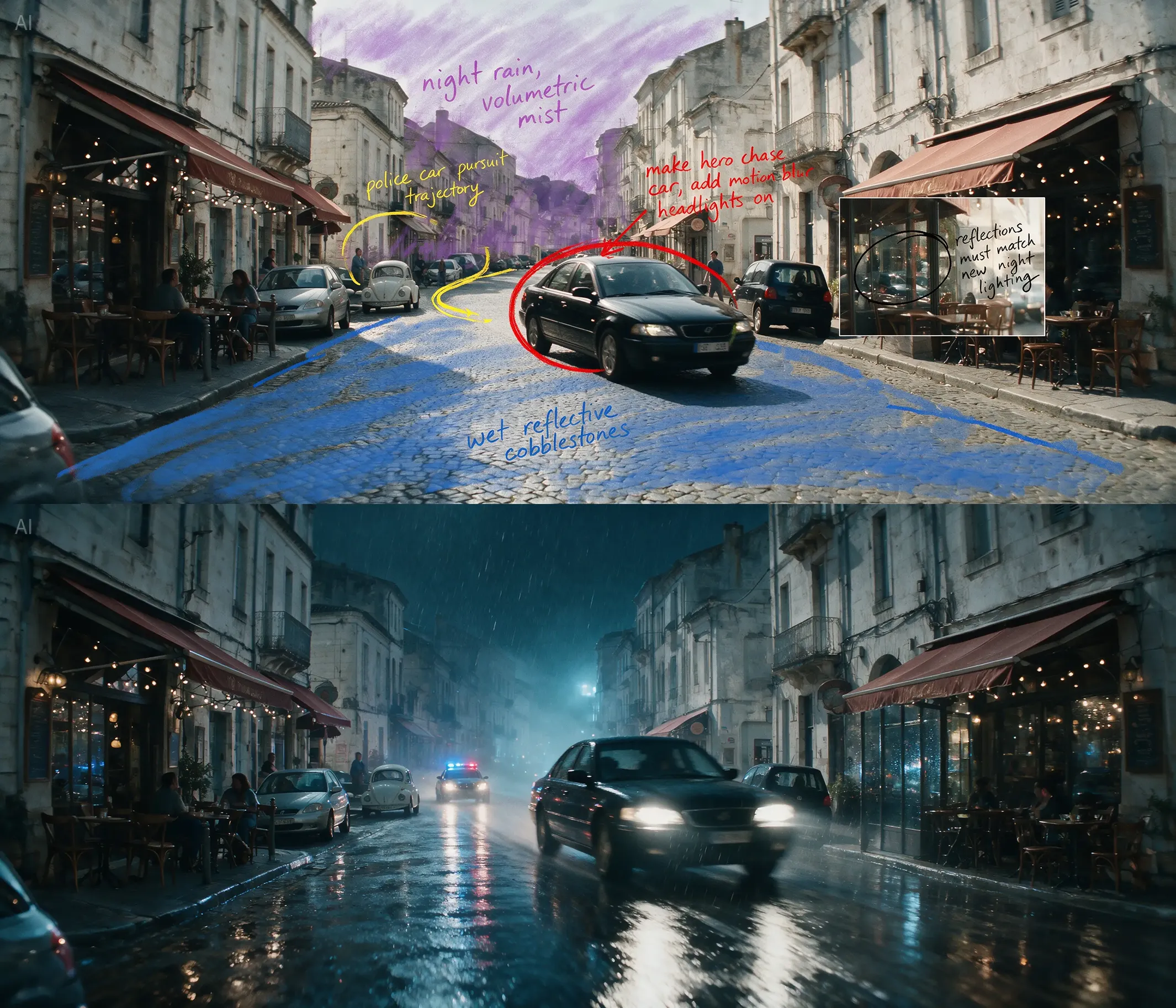
This could be useful in very normal creative work. An ecommerce designer can adjust a product detail without rebuilding the whole banner. A concept artist can test a new material in a scene without losing the lighting. A marketing designer can try another product color while keeping the same layout.
None of that sounds dramatic. But it is the kind of editing people actually do all day.
Sketches are useful when they keep the structure
Another useful direction is sketch-guided generation.
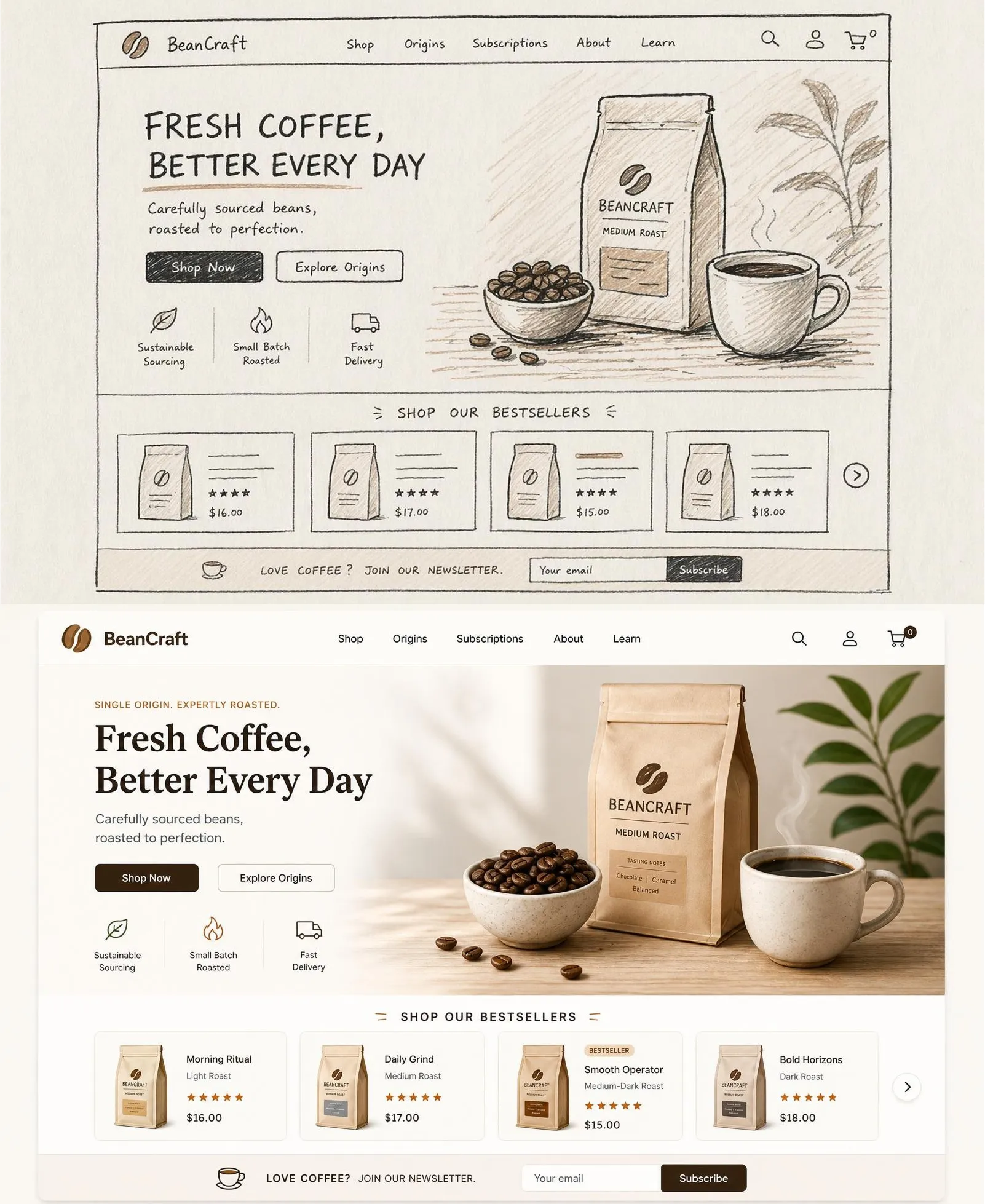
A rough wireframe, storyboard frame, or product layout is not supposed to be pretty. It is there to hold the idea in place. The important question is whether the model respects that structure when it renders the final image.
Seedream 5.0 Pro is aimed at this kind of task. A sketch can become a more finished visual without losing the basic layout. A simple page structure can turn into a SaaS hero concept. A rough product banner can become a more polished ecommerce visual. A storyboard panel can become a clearer frame for pitching a scene.
This does not replace design judgment. It does not magically turn every sketch into a finished campaign. But it can make the early stage faster, especially when you need to see several directions before deciding which one is worth refining.
Layer separation makes variations easier
Layer separation is one of the more practical Seedream 5.0 Pro features.
In a normal creative process, you rarely ship the first version. You change the product, replace the background, edit the text, test another subject, or make a version for another channel. If every version requires a full regeneration, the process gets messy very quickly.
Seedream 5.0 Pro is designed to separate parts of an image, such as product, background, subject, and copy. That gives creators more room to make changes without starting over.
This is especially useful for campaign assets, ecommerce graphics, social posts, and localized ads. The same base visual can become several versions. You can keep the composition and change the part that needs to move.
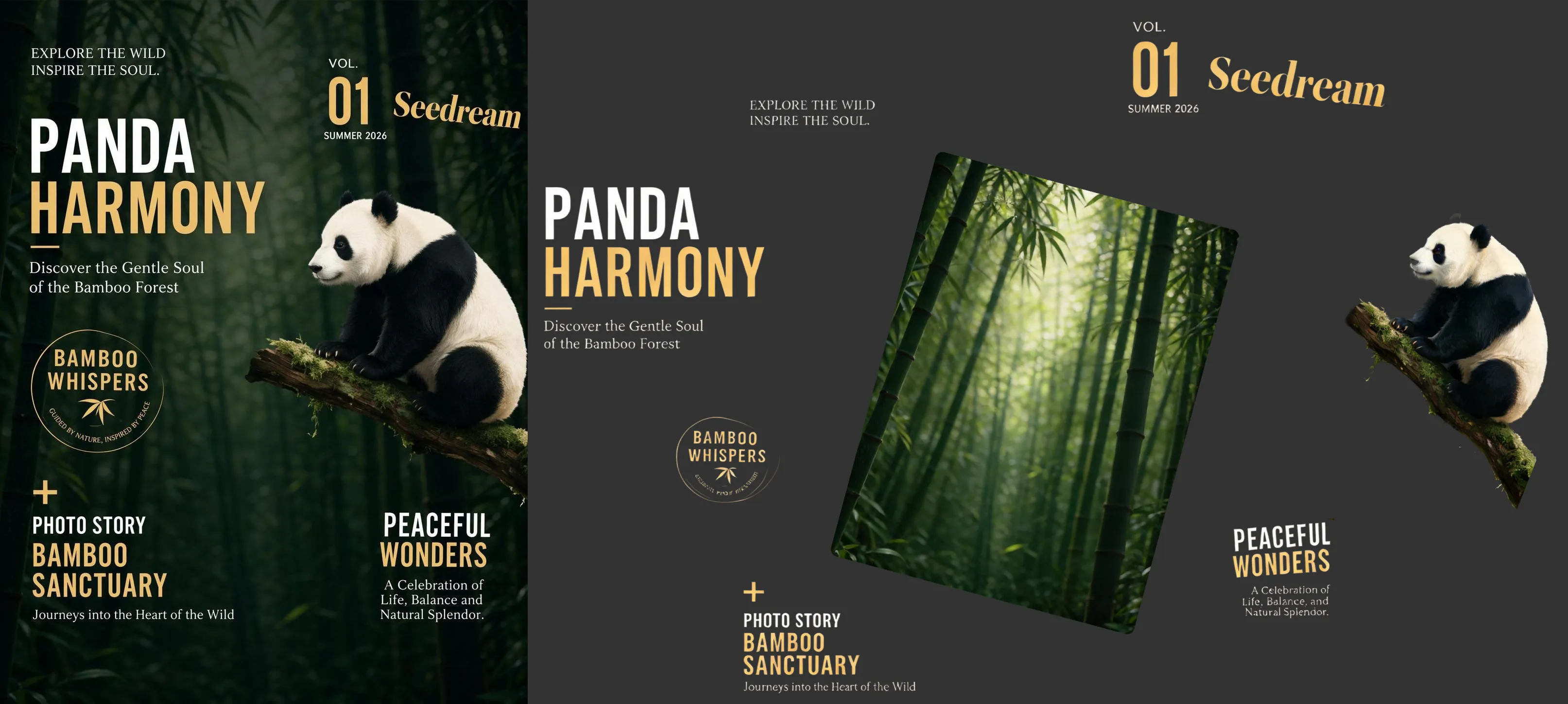
The important thing to watch is how clean the separated layers are in real projects. If edges are messy or the background fill breaks, the feature becomes less useful. But if it works well on everyday assets, it could save a lot of repetitive design time.
Infographics are harder than they look
A beautiful image is one thing. A good infographic is harder.
An infographic has to do several jobs at once. It needs a clear layout, readable text, good spacing, correct hierarchy, and enough visual polish to feel designed. It cannot just be attractive. It also has to make sense.
That is why Seedream 5.0 Pro's high-density information generation is worth watching. The model is meant to handle slides, educational visuals, posters, diagrams, and other layouts where text and structure matter.
This could help teachers, content teams, product marketers, and designers who often need visual explanations, not just decorative images.
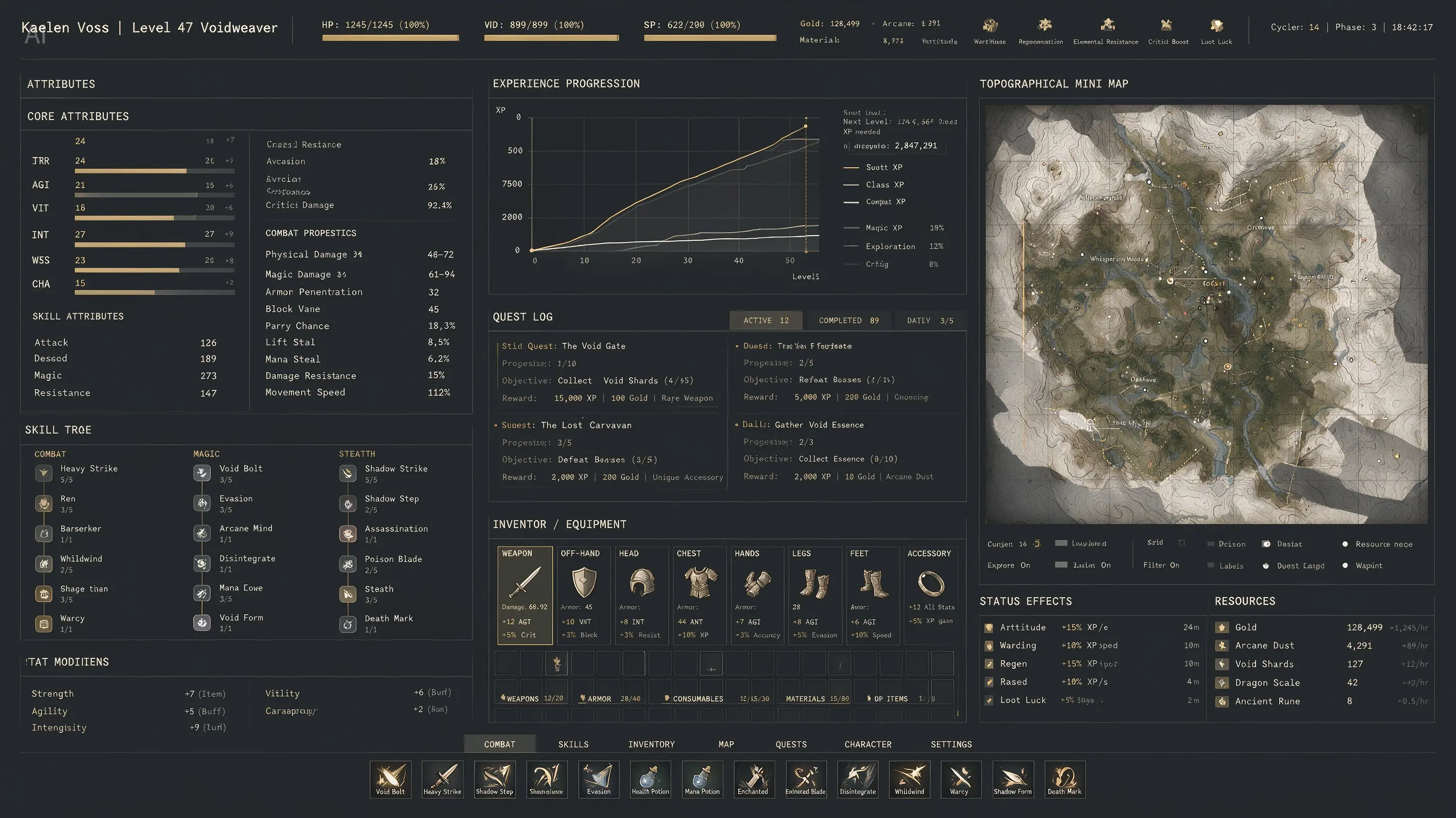
The risk is obvious: text-heavy images leave less room for mistakes. A misspelled label, wrong number, or broken layout can make the whole image unusable. So this is not a feature to trust blindly. It is a feature to test with real briefs.
Still, the direction is important. AI image models are starting to handle layout and information, not only mood and style.
Realism is about materials, not just sharpness
Photorealistic AI images often look good at a glance and strange after a few seconds. The problem is usually not resolution. It is light, texture, or material behavior.
Glass should reflect the room around it. Metal should not look like plastic. Skin should not be waxy. A person should feel like they belong in the same light as the background.
Seedream 5.0 Pro puts a lot of focus on these details. The examples around glass, architecture, skin texture, reflections, and cinematic lighting suggest that the model is trying to get closer to how real objects behave in a scene.

This matters for commercial work. Product images need believable materials. Architecture visuals need convincing glass, stone, and light. Portraits need skin that looks alive rather than over-smoothed. Game and film concept art needs characters that feel grounded in the environment.
For this part, the question is simple: does the image still hold up when you look closely?
Multilingual image generation is about layout, not just language
Multilingual image generation is easy to underestimate. It sounds like translation. It is not.
Once text is inside an image, the model has to deal with font shapes, spacing, line breaks, reading direction, and local visual habits. Arabic needs right-to-left layout. Spanish needs accents. Japanese and Korean need correct character forms. The design still needs to feel balanced after the language changes.
Seedream 5.0 Pro supports multiple languages beyond Chinese and English, including Spanish, Portuguese, Arabic, French, German, Russian, Japanese, Korean, Thai, Vietnamese, Indonesian, Malay, Tagalog, and Turkish.
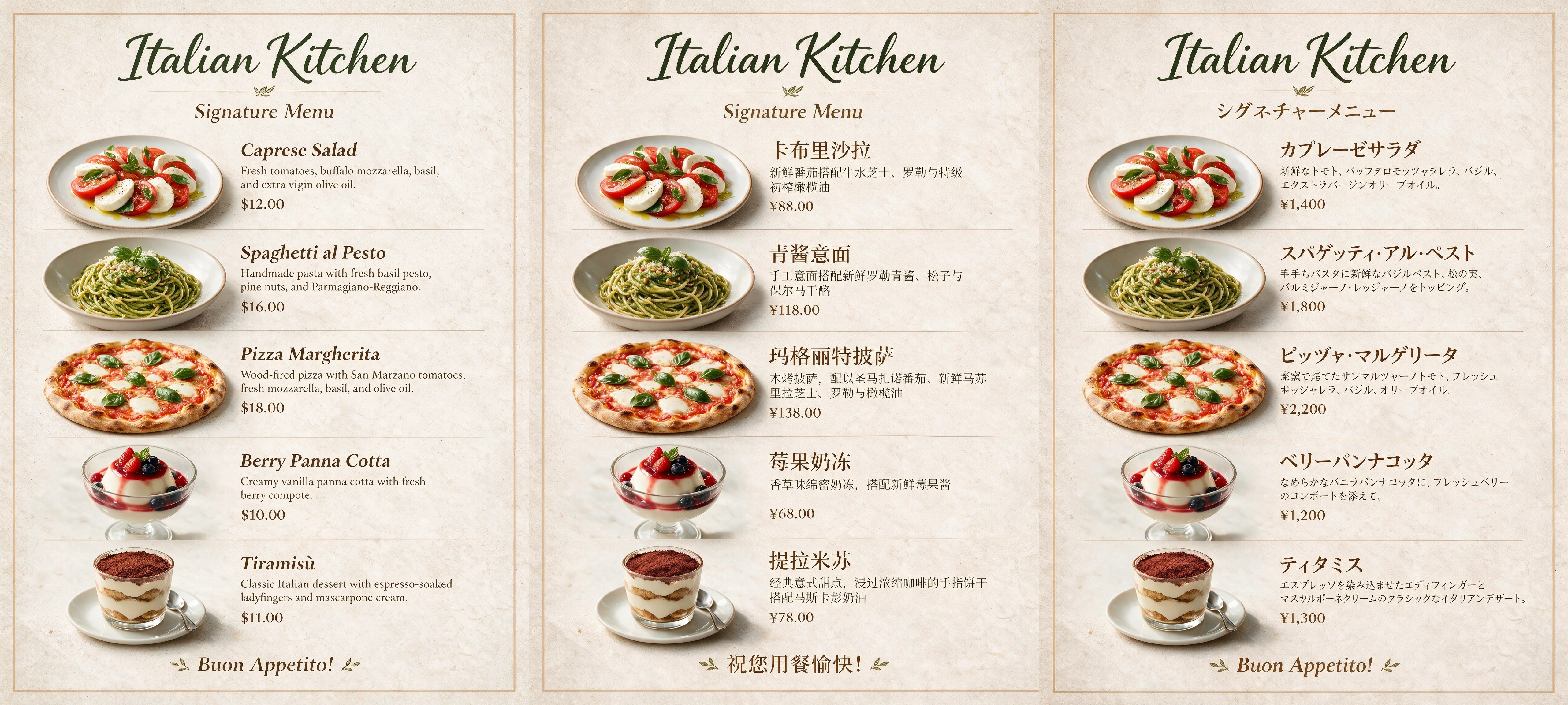
For global marketing teams, this is a big deal if it works consistently. One campaign concept could become several localized versions without rebuilding each poster from scratch.
That does not remove the need for human review. Local copy still needs checking. But it could make the first round of localization much faster.
Who should try Seedream 5.0 Pro first?
Designers should try it if they often move from rough ideas to polished layouts and need better control over edits.
Ecommerce teams should look at it for product banners, detail pages, background swaps, and fast campaign variants.
Content and education teams may find it useful for slides, explainers, visual summaries, and infographics.
Game, film, and concept artists may use it for sketch rendering, environment tests, character looks, and mood development.
Global marketing teams should pay attention to multilingual poster generation, especially if they create the same campaign across several regions.
Use Seedream 5.0 Pro on Artflo
Seedream 5.0 Pro has been available on Artflo, where you can use it inside a visual AI workflow instead of treating it as a separate image generator.
That is useful because most creative work does not end with one image. You may want to bring in reference images, reuse previous generations, compare versions, edit a product detail, localize a poster, or pass the result to another model.
Artflo is built for that kind of process. You can keep your prompts, references, generated assets, and model steps together on one canvas, then use Seedream 5.0 Pro for the parts where it is strongest: precise edits, sketch-to-image drafts, layer separation, dense layouts, realistic materials, and multilingual visuals.